행정 · Administrative
How do I apply to Keimyung University as an Epitech student?
L
Luca Vancomerbeke신입생Publié le 7 June 2026

Prerequisites
Once you have been accepted to Keimyung, you will need to prepare certain documents while waiting for the university’s enrollment email. The required documents may change slightly, but generally speaking, here is what you will be asked to provide:
- A certificate of enrollment in English
- A language test certificate in English (TEPitech certificate)
- A transcript of your grades (Bachelor’s Transcript) in English
- A letter of recommendation in English
- A color copy of your passport
- A photo against a white background
As for the first three documents, you can find them on the Epitech intranet, in the Documents section of your profile.
For the letter of recommendation, ask a member of the teaching staff at your campus or a member of the International Relations office to write it for you (for practical reasons, we recommend starting with your teaching staff).
Réception du mail de Keimyung
When you receive the email from Keimyung, you will notice that two additional documents are attached. These are forms that you must complete, sign, and submit with your application. These documents are a consent form for the use of personal data (a mandatory requirement; failure to provide it may result in your application being denied) and a medical certificate.
Once you have completed these documents, let’s move on to the next step.
In this email, you will find two links. The first is a Notion link, providing you with some guidance and information about Keimyung, such as details regarding dormitories, the commute to the university, and the list of available courses.

The second link is the link to the registration intranet.
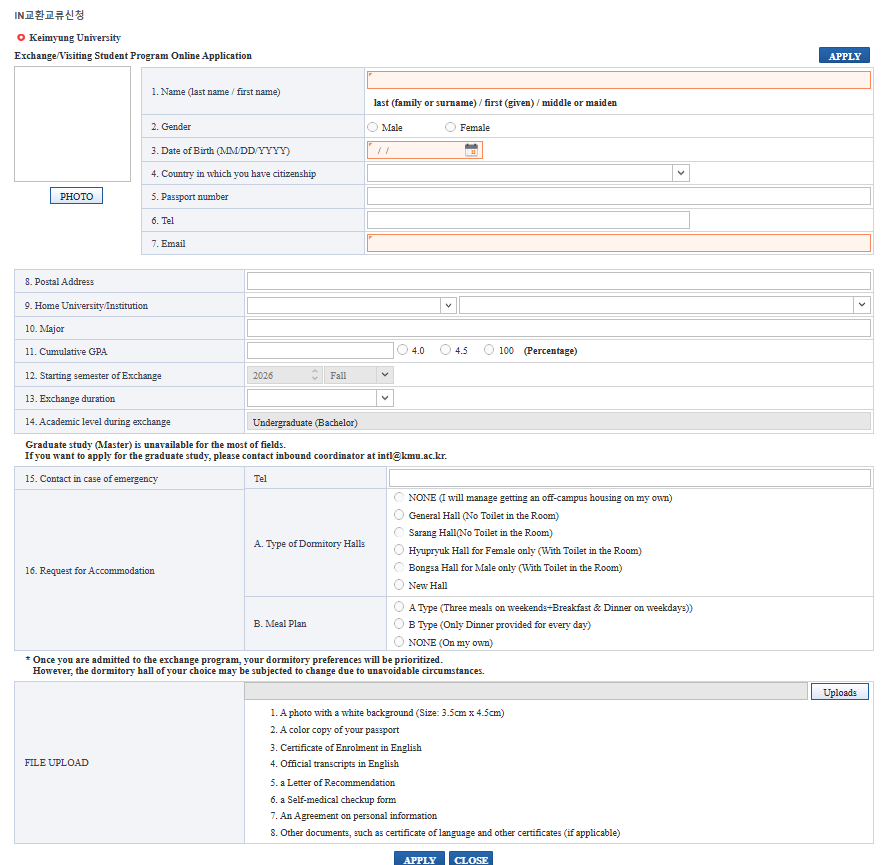
Fill in all the fields with your information and your preferences regarding dormitories and meals. Regarding the dormitories, please note that you are required to be there every night, unless you indicate that you will not be sleeping there, in which case you will not be allowed to enter on that night. There is a curfew in place from 11:30 PM to 5:30 AM, which means that if you miss the curfew, you will receive a penalty and will not be able to access the dormitory that night. If you decide to request a spot there, do so with full knowledge of the consequences!
Once these fields are filled out, go to the Uploads section to upload your documents.
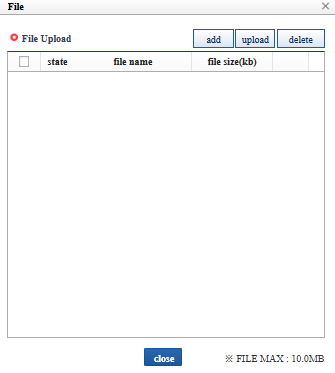
Click “Add,” upload one document, and repeat the process (as of the date this guide was written, the ability to upload multiple documents has not yet been implemented on the intranet). Once all documents have been uploaded, select them using the checkbox on the left, then click “Upload.”
Once this is done, you will receive an automatic email confirming that your registration has been processed. If any document is missing, incomplete, or incorrect, the school will contact you to let you know.
Inscription finished
Your registration is now complete! Be sure to check your Epitech email as often as possible to make sure the school hasn’t contacted you regarding any missing or incorrect documents. If you don’t receive any emails from Keimyung after the automated email, that means everything is in order!
In that case, the next email you’ll receive will be your acceptance letter from Keimyung. The next step will be applying for your visa!
ce guide t'a aidé ?